Beehiiv Pricing in 2026: What You’ll Pay, Plus 20% Off

Beehiiv Pricing in 2026: What You'll Pay, Plus 20% Off
Last updated: October 26, 2026
This Beehiiv pricing guide for 2026 explains what each plan costs and how to get 20% off your first three months.
beehiiv is a newsletter platform for creators and businesses that want to publish, grow an audience, and earn money in one place. Its current plans are Free, Lite, Pro, and Enterprise after a pricing update on October 1, 2026. Start free, move to paid features when they solve a real need, and use our partner link below to get 20% off your first three months on an eligible paid plan.
Get 20% off beehiiv for 3 months
If you want the full picture of the platform, read our complete beehiiv review. This article focuses on the price.
How much does beehiiv cost in 2026?
beehiiv costs $0 on Free for up to 2,500 subscribers. At the 1,000-subscriber level, Lite costs $59 month to month or $49 per month with yearly billing. Pro costs $109 month to month or $95 per month with yearly billing. Enterprise pricing is custom, and paid-plan prices rise with your subscriber tier.
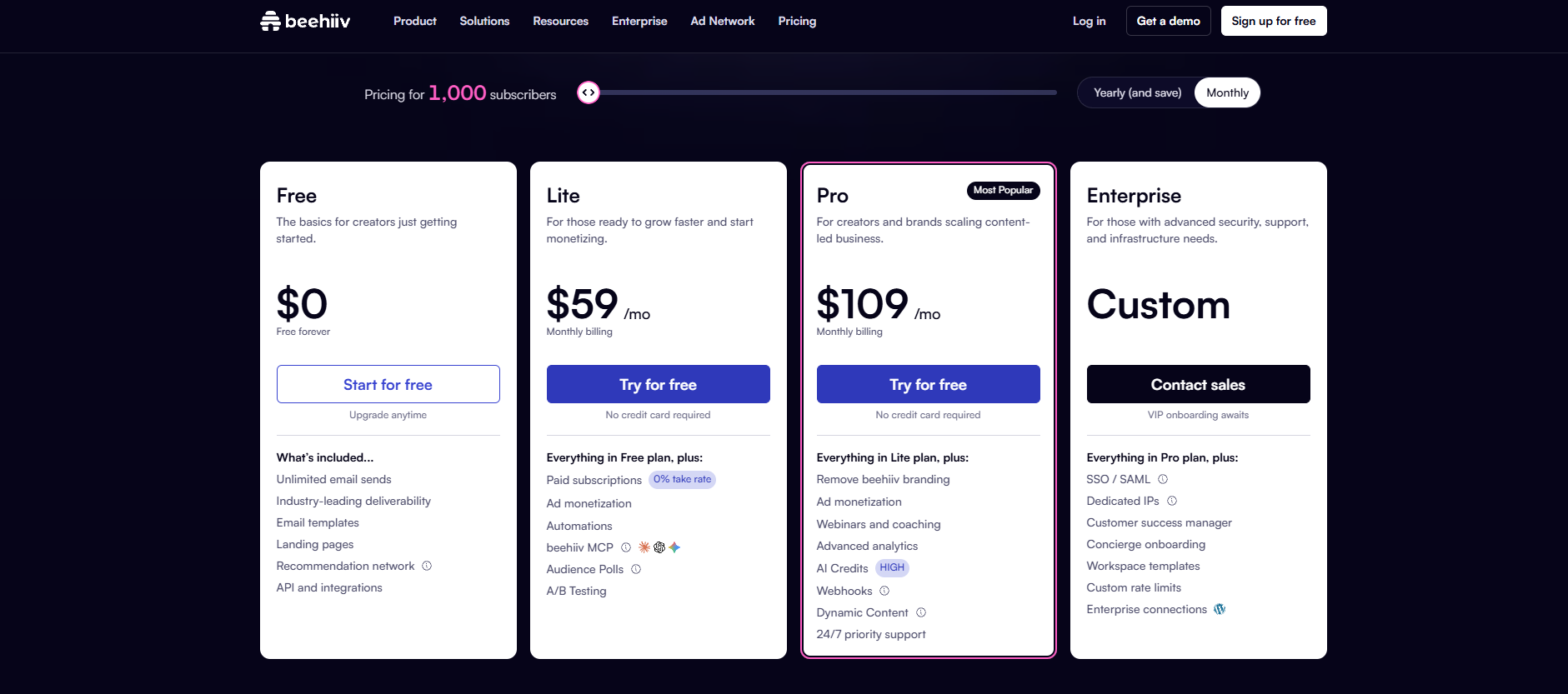
| Plan | Monthly billing, entry tier | Monthly equivalent with yearly billing | Maximum subscribers supported |
|---|---|---|---|
| Free | $0 | $0 | 2,500 |
| Lite | $59 | $49 | 100,000 |
| Pro | $109 | $95 | 250,000 |
| Enterprise | Custom | Custom | Custom |
These beehiiv pricing plans use two different limits: the subscriber tier you buy and the maximum audience a plan can support. Paying Lite's entry price does not buy capacity for 100,000 subscribers. That is the plan's upper limit, with higher-priced tiers along the way.
Annual prices are monthly equivalents, not monthly installments. At the published entry rates, $49 per month means a $588 annual base subscription, while $95 means $1,140 each year before any other adjustments. Compare the amount due now, not just the largest number on a pricing card.
The October update replaces Launch, Scale, and Max
Older beehiiv reviews and pricing guides may still list Launch, Scale, and Max. The current mapping is Launch → Free, Scale → Lite, and Max → Pro. Enterprise keeps its name. This is more than a name change, because features, limits, and paid prices also changed.
The new pricing applies to new customers from October 1, 2026. Existing customers move to the update at their first renewal on or after November 1, 2026. Annual customers keep their old price through their current annual term. So an older invoice can still be correct for that account, even if a new customer would pay a different rate.
When comparing beehiiv pricing plans for 2026, use the current plan name, subscriber count, and billing frequency together. A screenshot without all three is not enough for a dependable budget.
Free gives you room to establish a publishing habit
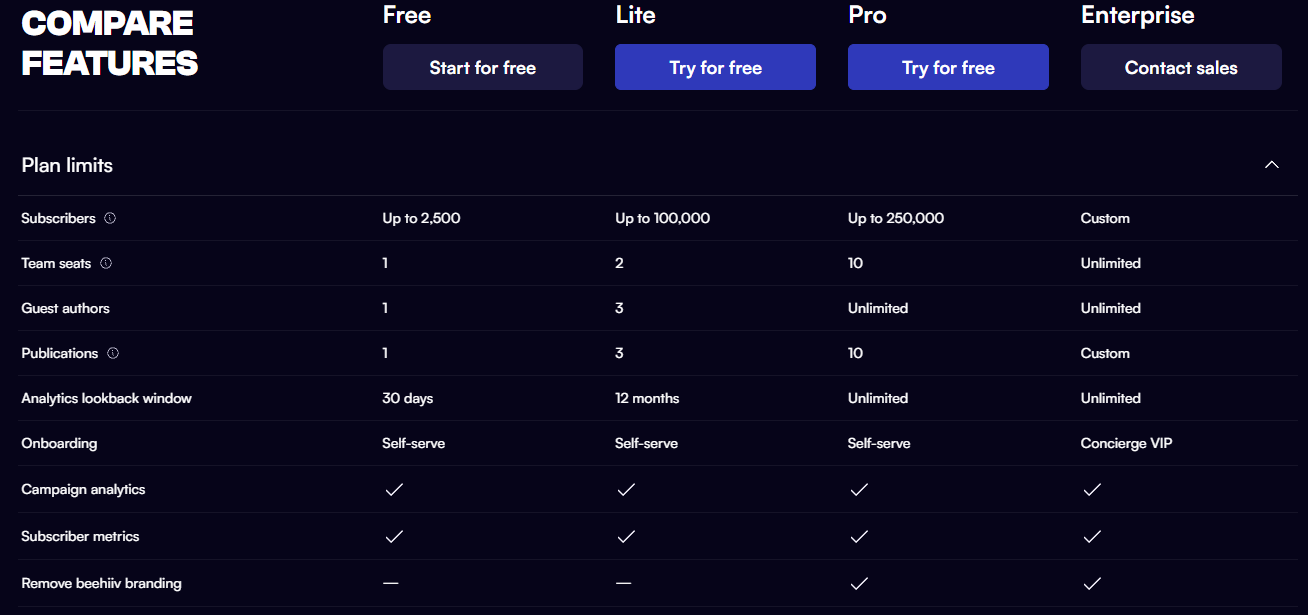
The official beehiiv free plan supports up to 2,500 subscribers, unlimited email sends, one publication, and one team seat. The current comparison also lists a 30-day analytics lookback window. That makes Free a practical starting point for a solo publisher testing a newsletter before paying for software.
The October announcement extends access to core products, including podcasts, community, MCP, and digital products, to every plan, including Free. Access does not mean the same limits or advanced features across plans, so check the exact feature you want.
Free is worth considering when your immediate priorities are:
- Publishing consistently: build a repeatable writing and sending routine before you add paid workflows.
- Testing a topic: see whether readers subscribe and engage before you raise software spend.
- Running one publication alone: avoid paying for team capacity you do not need.
- Keeping audience costs steady: stay within the published subscriber cap while you test your format.
For example, a solo writer with 800 subscribers and one weekly issue should first decide what a paid upgrade would change. If the answer is only more features to explore, staying free may be the better choice. If you're still at that stage, our guide on how to monetize a newsletter with under 2,000 subscribers explains which revenue options make sense before you upgrade.
Lite adds tools for growth and revenue
Lite brings paid subscriptions with a 0% platform take rate, ad revenue, automations, audience polls, and A/B testing. It supports up to 100,000 subscribers across its paid subscriber tiers. Choose it when those features support a clear publishing or revenue workflow, not because the word growth sounds appealing.
Automation matters when every new reader needs the same intro. Instead of sending background info after each signup, you can set up a welcome path that introduces the publication and points readers to useful content. beehiiv's automation tools support subscriber journeys and conditional workflows.
Referral tools can also connect audience growth with reader engagement. Beehiiv's referral program allows publishers to give rewards for bringing in new subscribers. The program can start a workflow when a reader hits a milestone or referral count. A realistic use case is sending exclusive content after a reader earns a set reward.
Treat revenue features as opportunities, not guaranteed income. Your upgrade choice should still work if the first month brings in little money. Budget the subscription as an expense you can carry while you test what your audience actually wants.
Pro serves larger teams and more demanding publications
Pro adds branding removal, dynamic content, webhooks, more AI credits, and 24/7 priority support. Its higher limits include 10 team seats, 10 publications, unlimited guest authors, unlimited analytics history, and support for up to 250,000 subscribers.
Those differences matter most when you already have a clear need. Removing platform branding can support a publication's presentation. Extra seats let more colleagues work in the account. Longer analytics history supports comparisons beyond a short reporting window. The value is the workflow each feature unlocks, not the length of the feature list.
Use this shortlist before choosing a paid plan:
- Choose Lite when its publishing, automation, and revenue tools meet your needs within its team and publication limits.
- Choose Pro when branding removal, extra collaborators, more publications, or advanced tools are necessary.
- Discuss Enterprise when you need custom limits, dedicated infrastructure, SSO/SAML, or concierge onboarding.
Avoid paying for Pro only because you think you may need it later. First write the feature or limit that makes Lite unsuitable today. If nothing specific comes up, test the lower-cost option against your real publishing routine.
Your actual bill depends on audience size and payment timing
beehiiv separates plan type from subscriber tier. Plan type sets the features. Subscriber tier sets the price inside a paid plan. Active subscribers across publications in the workspace count toward the account total, not each publication on its own.

For example, beehiiv's documentation says an account with 3,000 active subscribers in one publication and 2,000 in another has 5,000 active subscribers. Use the combined total when you check the pricing selector. Otherwise, a multi-publication budget can start from the wrong tier.
Before you buy, record these five items:
- Current active subscriber count: use your account total, not one newsletter's estimate.
- Required features: identify the lowest plan that includes them.
- Expected growth: check the next subscriber tier as well as today's price.
- Billing cadence: separate an annual commitment from monthly payment.
- Checkout total: verify the discount, amount due, and renewal price before you confirm.
Also separate software charges from payment processing costs. A 0% platform take rate does not mean paid subscriptions are free to collect. Payment processing still affects the economics. Compare net revenue after those costs, not gross subscription sales.
Get 20% off your first three months
beehiiv's official Partner Program documentation says referred users get a 14-day trial and 20% off their first three months on a paid plan. Our partner link gives you the same offer. Start with the link rather than a coupon code from a roundup site, since those codes are often expired or unverified.
Claim 20% off beehiiv for 3 months
For illustration, if the offer applies to the published entry-level monthly rates and your subscriber tier stays the same:
| Plan | Standard monthly price | Price after 20% discount | Savings over three discounted months |
|---|---|---|---|
| Lite | $59 | $47.20 | $35.40 |
| Pro | $109 | $87.20 | $65.40 |
These calculations cover the base subscription only. They do not prove you qualify, promise that promotions stack, or explain how an annual purchase will be discounted. The checkout offer controls the sale.
To redeem, open our link, follow the signup flow, and check the discount before you pay. The discount applies at checkout through the link itself. If you have a separate code, the account's Billing & Plan flow includes an Add Promotion Code option.
The beehiiv affiliate program is separate from your newsletter's reader-referral program. One rewards recommendations of the software. The other encourages readers to recommend your publication. You do not need to become an affiliate to use a qualifying partner signup offer.
Compare beehiiv alternatives against your revenue model
beehiiv vs Substack

Substack is free to publish on regardless of subscriber count, but it takes 10% of paid subscription revenue, with payment-processing charges added. beehiiv's paid subscription tools use a 0% platform take rate, alongside its software subscription cost. (support.substack.com)
A simple platform-fee illustration: at $1,000 in monthly paid subscription revenue, Substack's 10% share is $100. Compare that with your actual beehiiv tier, not automatically its $59 entry price. Processing costs and differences in features still need separate thought. For a full feature-by-feature comparison, read our beehiiv vs Substack guide.
beehiiv vs Mailchimp
Mailchimp's current Free plan allows 250 contacts and 500 monthly sends, with a 250-send daily limit. beehiiv Free allows 2,500 subscribers and unlimited email sends. Those limits make send frequency and audience size key points in this comparison. (mailchimp.com)
Write out your normal month before you compare paid offers. Four issues sent to the full audience create a different need from occasional announcements. Then check the integrations and workflows your business actually uses.
Kit vs beehiiv
Kit's Free plan supports up to 10,000 subscribers, unlimited broadcasts, forms, and landing pages. Its documentation puts visual automations on paid plans. For someone choosing free audience capacity, that larger subscriber allowance deserves consideration alongside beehiiv's publishing and revenue tools. (help.kit.com)
Avoid choosing from a single best-platform ranking. Compare your list size, must-have workflows, and intended revenue model. Then test the finalists with the same sample newsletter and signup journey.
Start with the plan your next publishing cycle needs
Choose Free to establish your publication, Lite when its paid features solve a clear problem, and Pro when advanced tools or higher limits justify the upgrade. New accounts can test Pro features with a 14-day trial, without a credit card, subject to trial limits.
Before you commit, confirm your subscriber tier, billing schedule, and post-promo price. A short-term discount should improve a sensible purchase, not push you to buy capacity you will not use.