Fyxer Pricing: Plans, Credits and What You'll Pay

Last updated: October 21, 2026. Prices are in USD as listed on Fyxer's pricing page. The price does not include taxes.
Short answer: Fyxer AI email assistant pricing now has four plans.
Free is $0 with 400 credits a month.
Pro is $37 per person per month on annual billing ($49 if you pay monthly).
Team is $64 per person per month on annual billing ($99 monthly).
Enterprise is custom priced. The monthly credit limit matters more than the seat price.
If you want to try it first, you can start your Fyxer free trial with 20% off your first 2 months.
What Fyxer does in 30 seconds
Fyxer is an AI email assistant that works inside Gmail or Outlook, so it can also feel like a Gmail AI assistant. It sorts incoming email, drafts replies in your own style, sends a note taker into your video meetings, and keeps track of follow-ups. It does not send email on its own. You review the draft and send it yourself.
That matters for Fyxer pricing because each task uses credits. Inbox sorting, meeting recording, and chat all share one monthly pool.
Fyxer plans at a glance
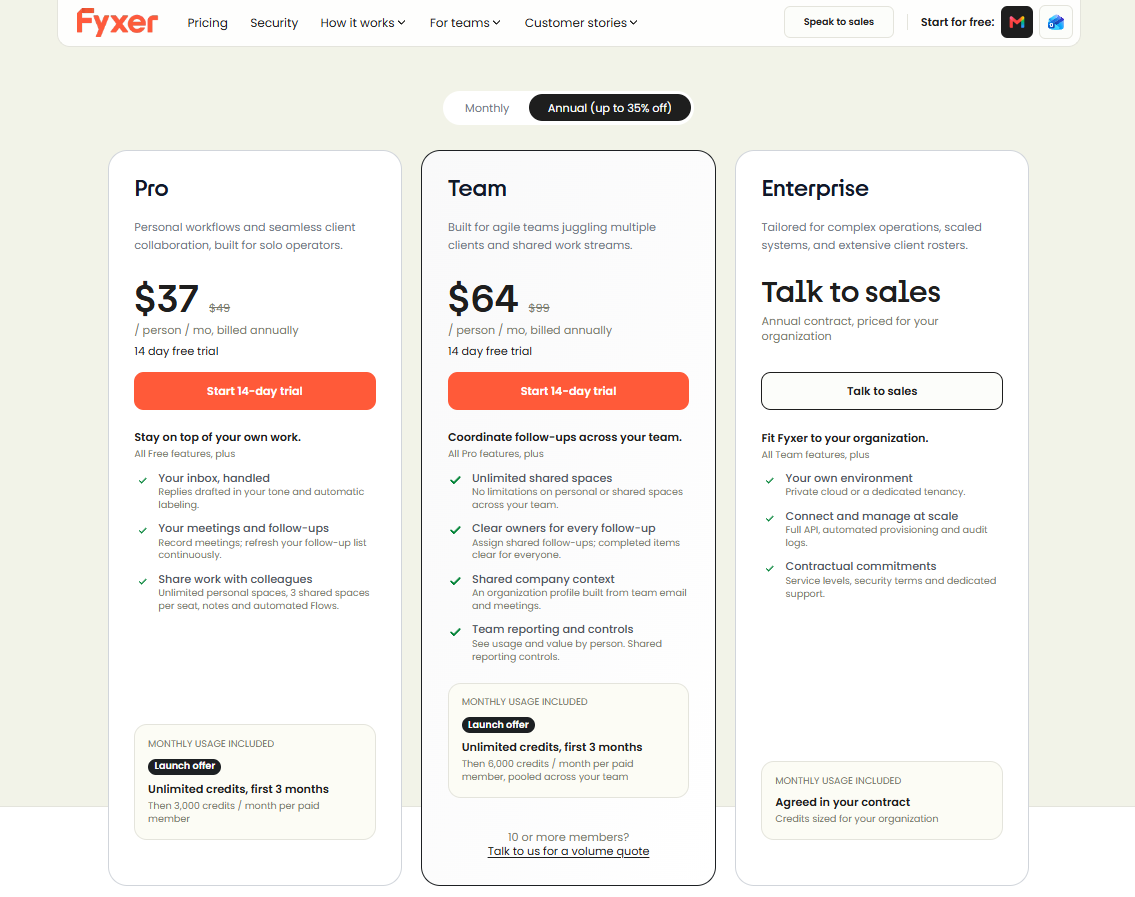
| Free | Pro | Team | Enterprise | |
|---|---|---|---|---|
| Price (annual billing) | $0 | $37 / person / mo | $64 / person / mo | Custom |
| Price (monthly billing) | $0 | $49 / person / mo | $99 / person / mo | Annual contract |
| Monthly credits | 400 | 3,000 per paid member | 6,000 per paid member, pooled | Agreed in contract |
| Inbox sorting and labels | No | Yes | Yes | Yes |
| Replies drafted in your tone | No | Yes | Yes | Yes |
| Meeting notes | Audio notes | Every meeting, with video | Every meeting, with video | Every meeting, with video |
| Personal Spaces | 3 | Unlimited | Unlimited | Unlimited |
| Shared Spaces | No | 3 per seat | Unlimited | Unlimited |
| Support | Help center | Reply within one business day | SLA and dedicated channel |
Both paid plans start with unlimited credits for the first 3 months as a launch offer. After that, the monthly limits above apply.
See Fyxer's current plans and start your trial →
The Free plan: useful, but not the full product
Free is more of a test drive than a full inbox assistant. You get 400 credits a month, a personal profile built from how you write, a daily dashboard briefing, a weekly email briefing, a follow-up list, and 3 personal Spaces.
What you do not get is the main feature. Free does not sort or label your inbox, and it does not draft replies for you. Meeting notes are audio only, and they use your 400 credits.
If you only use chat, 400 credits is about 20 messages. If you only record meetings, it is about 6 hours 40 minutes.
Pro: the plan most solo users want
Pro is built for solo operators: freelancers, consultants, founders, and agents who handle their own email and meetings.
On top of Free, you get:
- Inbox sorting and labels.
- Replies drafted in your tone.
- Video meeting notes for every meeting.
- A follow-up list that stays current.
- Unlimited personal Spaces and 3 shared Spaces per seat.
- A daily email briefing.
- Analytics on hours saved and value returned.
Cost: $37 a month on annual billing, or $444 a year. Monthly billing is $49, or $588 a year. Annual billing saves about 25%.
Team: for shared work and shared follow-ups
Team adds the features a group needs on top of Pro: unlimited shared Spaces, clear owners for each follow-up, an org profile built from team email and meetings, and reporting by person.
The team pools credits, sharing 6,000 per paid member. That helps when some people run many meetings and others barely use the tool.
Cost: $64 a month per person on annual billing, or $99 monthly. Annual billing saves about 35%. If you have 10 or more members, Fyxer asks you to contact sales for a volume quote.
Enterprise: custom pricing
Enterprise is an annual contract priced for your team. It adds a private cloud or dedicated tenancy, a full API, automated provisioning, audit logs, SSO, data stored in your region, security review, and HIPAA terms. There is no fixed price, so you need to talk to sales.
How Fyxer credits work
Credits are the meter behind every plan. Here is what each action costs on Fyxer's pricing page:
| Action | Credits |
|---|---|
| Inbox sorting | 0.2 per email (5 emails per credit) |
| Meeting recording | 1 per minute (60 per hour) |
| Chat message | 20 per message |
| Flow (automation) run | 5 per run |
| Imported or uploaded recording | 30 per hour |
| Analyze the document | 30 per document |
| Deep research question | 175 |
| Profile rebuild on request | 650 (the first build is included) |
Fyxer's own examples show how far a monthly allowance can go:
- Pro (3,000 credits): 5,000 sorted emails, 25 recording hours, and 25 chat messages. Or 50 recording hours if you only record.
- Team (6,000 credits per member): 20,000 sorted emails, 25 recording hours, and 25 chat messages per member.
The takeaway: sorting email is cheap, but meeting recording and chat use credits fast. If you spend a lot of time in calls, recording is what will use your allowance.
What happens when credits run out
Fyxer warns you at 80% and 100% of your allowance. On paid plans, inbox sorting pauses first and recording continues. Fyxer then points you to the plan that fits better. On Free, metered actions pause until credits renew.
What will you actually pay? Three examples
These examples use a 4-week month. Your numbers may vary.
Light user on Pro.
50 emails a day over 22 working days is 1,100 emails, or about 220 credits.
5 hours of meetings a week is 20 hours, or 1,200 credits.
Add 20 chat messages at 400 credits.
Total: about 1,800 credits, which fits inside Pro's 3,000-credit limit.
Heavy meeting user.
150 emails a day is about 3,300 emails, or 660 credits.
12 hours of meetings a week is 48 hours, or 2,880 credits.
Add 30 chat messages at 600 credits.
Total: about 4,100 credits, which is above Pro's 3,000-credit limit.
You would likely hit the cap on Pro, so Team's 6,000 credits would fit better.
Small team.
5 people on Pro with annual billing is about $2,220 a year.
On Team it is about $3,840 a year.
The extra spend buys shared Spaces, assigned follow-ups, a shared company profile, and reporting. If you do not need those, Pro per person may be enough.
The free trial: what you get for 14 days
When you sign up, Fyxer gives you Team plan features for 14 days with unlimited credits. If you invite coworkers during the trial, they can use it too. The homepage says you need a work email.
When the trial ends, you drop to the Free plan unless you pay. Before it ends, check who is on your plan so you only pay for the people who need access.
Start the 14-day trial with 20% off your first 2 months →
Why you may see different Fyxer prices elsewhere
If other sites show different numbers, they are likely outdated. Earlier in 2026, Fyxer sold a Starter plan for $30 and a Professional plan for $50 per month, with a 7-day trial and no free plan. Many review sites still show those figures.
The current setup, with Free, Pro, Team, Enterprise, credits, and a 14-day trial, is what Fyxer's own page shows now. Fyxer also says people on legacy plans can stay on them or move to the new plans.
Hidden costs and fine print
- A seat is one paid member, even if that person connects more than one inbox or calendar.
- Viewers are free. People who only need access to notes, transcripts, or Spaces do not need a paid seat.
- The launch offer ends. Unlimited credits last only for the first 3 months.
- You can switch between Pro and Team, or between monthly and annual billing, in Dashboard → Admin settings → Billing.
- Cancelling is clean. If you delete your account, your inbox goes back to how it was before Fyxer.
- Fyxer drafts, you send. It does not send email for you.
How to get 20% off Fyxer
Fyxer's affiliate offer gives readers 20% off their first 2 months. If you searched for a Fyxer promo code, this is the current discount offer. You can claim it through this Fyxer link. Sign up with that link rather than going to the homepage first so the discount attaches to your account. Check that it shows on your first invoice. It applies to the first 2 months, not the full subscription.
Is Fyxer worth the price?
It is a good fit if:
- You get lots of client email and miss things.
- You spend time writing the same kinds of replies.
- You take many meetings and want notes and follow-ups drafted for you.
It is probably not for you if:
- You mainly want a rule-based sorter and do not want AI drafts.
- You rarely have meetings and your inbox is quiet. Free may be enough.
- You expect drafts to be ready to send every time. Some Fyxer reviews say they still need a quick edit.
The 14-day Fyxer free trial with unlimited credits is the best way to find out. Run it on your real inbox and real meetings, then check how many credits you used before picking Pro or Team.
Fyxer vs Superhuman and other alternatives
If you are comparing Fyxer vs Superhuman, or checking other superhuman alternatives, the biggest difference is the pricing model. Fyxer uses credits, so the real cost depends on how much email sorting, meeting recording, and chat you use.
That also matters if you are comparing AI email assistant pricing across tools like Fyxer, Otter AI pricing pages, or other AI email manager products. The seat price can look low, but the usage cap tells you what you can actually do.
FAQ
How much does Fyxer cost?
Pro is $37 per person per month on annual billing, or $49 monthly. Team is $64 on annual billing, or $99 monthly. Free is $0, and Enterprise is custom.
Does Fyxer have a free plan?
Yes. Free gives you 400 credits a month, but it does not sort your inbox or draft replies automatically.
Is there a free trial?
Yes. There is a 14-day Fyxer free trial with Team plan features and unlimited credits. After it ends, you move to Free unless you pay.
What are Fyxer credits?
They are a monthly allowance that pays for actions like sorting emails, recording meetings, chat messages, and more.
What happens if I run out of credits?
Fyxer alerts you at 80% and 100%. On paid plans, sorting pauses first and recording continues. On Free, metered actions pause until renewal.
Does Fyxer send emails for me?
No. It writes drafts in your inbox, and you decide what gets sent.
Can I get a discount?
Yes. This link gives you 20% off your first 2 months.
Bottom line
Fyxer's pricing is easy to read at first, but credits decide the real cost. For one person with a normal inbox and a few meetings a week, Pro at $37 on annual billing should fit. If you live in meetings, or you need shared follow-ups across a team, Team is worth a look.
The easiest way to settle it is to start the free trial with 20% off, track your credit use for two weeks, and then pick the plan.
Q&A
Question: How should I choose between Pro and Team if I am close to the Pro credit limit?
Short answer: Start with the thing using the credits. If most of your use is email sorting, Pro may still be enough because sorting is cheap at 0.2 credits per email. If most of your use is meeting recording or chat, Team may be the safer choice because it includes 6,000 credits per paid member and pools them across the team. Team also makes more sense if you need shared Spaces, assigned follow-ups, a shared company profile, or reporting.
Question: Why can the listed monthly price be misleading?
Short answer: The sticker price only shows the seat cost. The more important limit is the monthly credit allowance, because credits decide how much inbox sorting, meeting recording, chat, automation, and document analysis you can use. A light Pro user may stay well under 3,000 credits, while someone with many weekly meetings can go over that limit even if the seat price does not change.
Question: What should I check during the 14-day trial?
Short answer: Use Fyxer on your real inbox and real meetings, then review how many credits your normal workflow uses. Pay close attention to meeting recording and chat, since those use credits faster than inbox sorting. Also check whether you really need Team features like unlimited shared Spaces, assigned follow-ups, and team reporting before you pay for extra seats.
Question: Does connecting more than one inbox increase the number of paid seats?
Short answer: No. A seat is one paid member, no matter how many inboxes or calendars that person connects. For example, one person connecting both Gmail and Outlook still counts as one seat. Viewers are also free if they only need access to shared work such as notes, transcripts, and Spaces.
Question: What happens after the first 3 months of unlimited credits on paid plans?
Short answer: The normal monthly credit limits apply: 3,000 credits per paid member on Pro and 6,000 credits per paid member on Team. That is why it is worth checking your use before the launch offer ends. If your workflow only works while credits are unlimited, you may need to adjust use, switch plans, or talk to Fyxer about the right setup.